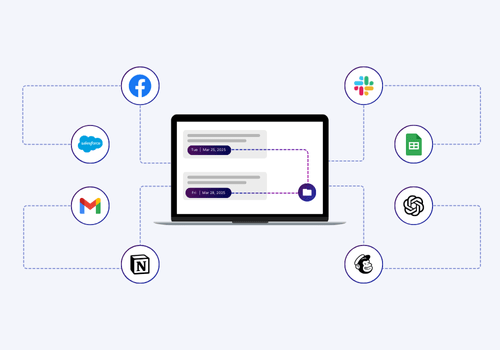
Zapier automation helps organizations remove repetitive tasks and work more efficiently across all departments.
It connects apps that teams already use and moves information between them automatically. This reduces manual effort and helps teams handle daily workloads with fewer interruptions.
Businesses rely on Zapier automation because it supports steady operations without requiring more staff.
The purpose of Zapier automation is to create reliable workflows that complete routine tasks on their own. These workflows help teams maintain consistent output, reduce errors, and shorten processing times.
When tasks such as data entry, reporting, or lead follow-up run automatically, teams gain more time for important work. This shift creates smoother internal operations and more predictable performance.
A strong automation setup also supports scalability. As companies grow, manual processes begin to slow teams down. Zapier automation helps businesses manage higher workloads by handling updates, notifications, and system connections without added strain. This gives companies a stable foundation for expansion because workflows adjust to increased demand without requiring additional employees.
Working with an experienced Zapier automation consultant strengthens this framework further. A consultant understands how to design dependable workflows, connect systems correctly, and prevent common setup errors. This guidance allows businesses to move faster with less risk. It also supports long-term operational stability, which helps teams work with confidence as their systems expand.
What Is Zapier Automation and How It Works
Zapier automation connects different applications so they can complete tasks without manual effort.
It helps teams move information from one tool to another through clear rules. This reduces repetitive work and supports consistent operations. Companies rely on Zapier automation as a tool for this because it provides steady results and helps them handle daily tasks with fewer delays.
Clear Definition
Zapier automation allows apps to communicate by sending data from one system to another when a specific event occurs.
Each workflow follows a predictable pattern that supports organized operations. This helps staff avoid repetitive actions that slow their work.
Automated app communication
Apps communicate through events detected by Zapier. These events start a workflow and move data to the next system without human input.
Workflow consistency
Data moves in the same sequence every time. This consistency supports dependable daily work and reduces the chance of manual errors.
Reduced manual workload
Staff spend less time entering information across multiple tools. This leads to a more predictable workflow for the entire team.
How Applications Communicate
Applications communicate through event-based connections that trigger automated tasks.
When something happens in one app, Zapier sends that information to another. This method removes the need to repeat the same task in multiple systems. It also keeps data aligned across tools that update at different times.
Event-based triggers
A workflow starts when a new event occurs in an app. This event signals the start of the automation process.
Structured data movement
Data moves from one tool to another in a fixed order. This supports accuracy during updates.
Real-time updates
Updates occur when the event happens. This ensures teams see current information without waiting for manual changes.
This communication method supports accurate and timely updates across systems.
What Are Triggers, Actions, Filters, and Multi-Step Workflows?
There are several parts of a Zapier automation. Each one plays a different role in how workflows operate.
Together, they support reliable and organized sequences of tasks. They also help businesses structure processes so they run without human oversight.
Triggers
Triggers start an automation when an event occurs. They detect actions such as new form entries or CRM updates.
Actions
Actions complete a task after the trigger fires. They update records, send messages, or add data to another system.
Actions support the flow of information across tools. They help maintain accurate and current records.
Filters
Filters decide whether a workflow should continue. They check conditions before the next step runs.
Multi-step workflows
A multi-step workflow allows several actions to run in a sequence. It handles complex tasks that require more than one update.
Multi-step workflows help teams run larger processes. They reduce manual oversight and keep systems aligned. These components work together to create organized and dependable workflows.
Why Businesses Depend on Consistent Workflow Execution
Businesses rely on steady execution because it keeps tasks predictable. A workflow runs the same way every time, which supports daily operations.
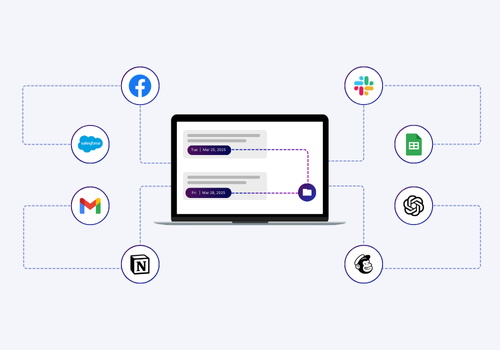
Consistent execution helps teams reduce delays and improve clarity across systems. It also reduces the chance of missed steps in processes that involve multiple tools.
Predictable task flow
Workflows follow the same pattern each time. This supports organized operations and removes confusion.
Accurate system updates
Data moves from one system to another without manual updates. This reduces errors caused by human input.
Operational stability
Teams depend on workflows that run correctly. This stability supports long-term efficiency and keeps tasks moving.
Businesses often work with a Zapier automation consultant to ensure their workflows are structured correctly. Expert setup supports cleaner processes and prevents issues caused by incorrect configuration.
How Workflow Automation Saves Time and Reduces Manual Tasks
Zapier automation helps teams complete routine work without constant manual input. It creates structured processes that run on their own.
This supports steady output and reduces delays that often come from handling repetitive tasks. That’s why companies use Zapier automation to improve daily operations and reduce workloads that take away time from meaningful tasks.
Time Savings
Automation saves time by completing frequent tasks the moment an event occurs.
The workflow handles each step without the need for manual checks. This gives teams more time to focus on work that requires attention and decision-making. Companies see faster task completion because the automation runs every time without pause.
Instant workflow execution
Automations run tasks right after the trigger happens. This eliminates the waiting time that slows teams down.
Fewer manual updates
Teams no longer update data across multiple apps by hand. This makes daily operations faster.
Routine task coverage
Automations handle recurring tasks that once required daily effort. This supports smoother schedules for staff.
Automation creates more available work hours across the team.
Error Reduction
Automation reduces errors by following the same logic every time.
It moves data consistently and applies set rules without deviation. This helps teams avoid mistakes that come from manual handling. Clean data also supports better planning across departments.
Consistent workflow logic
Each task follows fixed rules. This prevents inconsistent results during daily operations.
Accurate data movement
Information moves between tools without manual entry. This lowers the chance of typing or copying errors.
Reliable process execution
Workflows run in the correct order. This prevents skipped steps and mismanaged tasks.
Error reduction supports stable operations across multiple tools.
Increased Team Productivity
Teams work faster when they no longer handle repetitive tasks.
Automation staff to work on activities that require skill and judgment. This creates a more productive environment and helps teams handle more work without extra strain.
That’s just one way in which companies use Zapier automation to support long-term growth.
More time for skilled work
Teams shift their attention to tasks that matter. This helps improve daily performance.
Better focus on priorities
Automation removes the distraction of constant updates. This allows staff to manage core responsibilities with fewer interruptions.
Higher daily output
Teams complete more tasks because automation handles routine work. This supports stable productivity levels.
Increased productivity helps organizations maintain growth without increasing headcount.
Task Automation Examples
Automation works best when it replaces repetitive actions.
These examples reflect common areas where companies use Zapier automation to support consistent operations.
Lead routing
Leads move directly into the CRM when they arrive. This helps sales teams act quickly.
Reporting updates
Metrics and performance data sync into dashboards automatically. This supports daily decision-making.
Email triggers
Personalized emails are sent when forms are completed or when records change. This helps maintain timely communication.
System notifications
Slack or a project tool alerts when important events occur. This keeps teams updated without checking multiple tools.
These examples show how automation replaces frequent tasks that slow teams down. A certified Zapier automation consultant can help companies build reliable workflows that support long-term operational efficiency.
Email Automation Workflows to Improve Engagement and Follow-Up
Zapier automation is also capable of supporting stronger communication by creating email workflows that respond to events in real time.
Personalized email sequences send messages based on the actions customers take. This helps businesses maintain steady engagement without writing each message manually. A structured sequence also keeps communication clear and consistent for every new contact.
Trigger-based outreach sends emails automatically when specific events occur. These events include new form submissions, CRM updates, or changes in a lead’s status. This helps teams respond at the right moment instead of checking inboxes throughout the day. Trigger-based workflows also support faster follow-up times, which is important for both sales and support teams.

Automated follow-ups help teams stay organized by handling reminders and routine email tasks. These workflows replace manual inbox operations that slow down daily work. Messages are sent automatically when a customer completes a step, requests information, or needs a follow-up.
A Zapier automation consultant can help set up these sequences so they run dependably and support consistent communication.
Common Errors in Automation and How to Avoid Them
Businesses often face issues when workflows are not configured correctly.
Zapier automation depends on clear steps, correct logic, and accurate connections between apps. When any part of the setup is incomplete, workflows fail or create unexpected results.
These errors slow down teams and reduce trust in automated systems. That’s why a well-structured setup done by a certified Zapier expert is so important.
It helps companies avoid these problems and maintain consistent operations.
Misconfigured Triggers
Misconfigured triggers cause workflows to fire at the wrong time or not at all. This happens when the selected event does not match the intended workflow or when the app settings do not align with actual user actions.
Duplicate Actions
Duplicated actions lead to repeated messages, doubled records, or multiple entries across systems. This creates confusion for teams and customers. It also makes reporting less accurate. Avoiding duplicate actions helps teams keep data clean and organized.
Incomplete Integration Steps
Automations fail when integration steps are not completed properly. This includes incorrect field mapping, missing authentication, or incomplete setup inside connected tools. Data does not move correctly because the wrong fields were selected. Connections break when app permissions expire or updates occur.
The connected tool needs additional configuration before the workflow can run.
Completing integration steps ensures reliable communication between systems.
How an Expert Prevents These Issues
A skilled Zapier automation consultant checks every workflow for stability. The consultant verifies trigger logic, action structure, data mapping, and filter conditions. They test each step to confirm it produces the correct outcome.
They also review app settings and integration requirements so the workflow supports daily operations without interruption. This helps companies avoid common errors and maintain dependable automation setups.
Why Hire A Certified Zapier Automation Consultant
A certified Zapier automation consultant provides structure, clarity, and reliability when building workflows that support daily operations.
Their experience helps teams handle setups that involve multiple apps, conditional logic, data routing, and AI-driven tasks. This guidance is helpful for businesses that rely on accurate information flow across tools such as CRMs, project systems, messaging platforms, and analytics dashboards. Working with an expert prevents misconfigurations and reduces the risk of building workflows that break under real usage.
Companies also hire a zapier automation consultant when workflows grow complex.
CRM-heavy processes, multi-app workflows, or AI-integrated tasks often require precise logic and clean data mapping. DIY automation becomes inefficient when teams spend time fixing broken steps, repeating tests, or troubleshooting unpredictable behavior. An expert solves these issues by building workflows that run consistently and support long-term operational efficiency.
Frequently Asked Questions
How does Zapier automation save time?
Zapier automation saves time by handling routine tasks the moment a trigger event occurs. It moves data between apps without manual entry and completes steps that usually require daily attention from staff. This gives teams more time to focus on important work and reduces delays caused by repetitive actions.
Can I use Zapier without coding skills?
Yes. Zapier is built for users who want automation without writing code. Most workflows use simple selections such as choosing triggers, actions, and conditions from menus. A Zapier automation consultant can assist when workflows require advanced logic or connect several systems.
What are common use cases for businesses?
Common uses include lead routing, automated reporting dashboards, email follow-up workflows, CRM updates, notification alerts, and AI-supported tasks. These Zapier automation workflows help businesses reduce manual work and keep information consistent across tools.
What is the difference between a Zap and a workflow?
A Zap is a single automation made of a trigger and one or more actions. A workflow refers to the overall process that the Zap supports. A workflow may include several Zaps working together across multiple tools.
Does Zapier support AI automations?
Yes. Zapier supports AI automations through tools like ChatGPT and other AI platforms. These workflows can create content, send responses, summarize information, or support chatbot tasks. Many companies use a Zapier automation consultant to set up AI workflows that run reliably.